Numpy
Numpy 是 Python 数据科学计算的核心库,提供了高性能的多维数组对象及处理数组的工具
使用方式
import numpy as np
数组
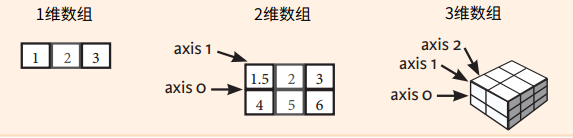
生成数组
简单生成
a = np.array([1, 2, 3])
# <class 'numpy.ndarray'>
# [1 2 3]

a = np.array([1, '2', 3])     # 取值为字符串
# <class 'numpy.ndarray'>
# ['1' '2' '3']

a = np.array([1, 2.0, 3])     # 取值去float
# <class 'numpy.ndarray'>
# [1. 2. 3.]
dtype类型
a = np.array([1, 2.0, 3],dtype=np.str)
# <class 'numpy.ndarray'>
# ['1' '2.0' '3']

# 其他类型
# np.int64            带符号的64位整数
# np.float32           标准双精度浮点数
# np.complex          显示为128位浮点数的复数
# np.bool             布尔值:True值和False值
# np.object           Python对象
# np.string_          固定长度字符串
# np.unicode_         固定长度Unicode
copy参数
# copy参数   默认True
a = np.array([1, '2', 3])
b = np.array(a, copy=True)
c = np.array(a, copy=False)
# 635743528800
# 635743684528
# 635743528800
初始化占位符
# 3行4列
a = np.zeros((3, 4))
# <class 'numpy.ndarray'>
# [[0. 0. 0. 0.]
#  [0. 0. 0. 0.]
#  [0. 0. 0. 0.]]

# 2行3列4纵
a = np.ones((2, 3, 4,2), dtype=np.int16)
# <class 'numpy.ndarray'>
# [[[1 1 1 1]
#   [1 1 1 1]
#   [1 1 1 1]]
#
#  [[1 1 1 1]
#   [1 1 1 1]
#   [1 1 1 1]]]

# 创建均匀间隔的数组(步进值)
a = np.arange(10, 25, 5)
# <class 'numpy.ndarray'>
# [10 15 20]

# 创建均匀间隔的数组(样本数)
a = np.linspace(0, 2, 9)
# <class 'numpy.ndarray'>
# [0.   0.25 0.5  0.75 1.   1.25 1.5  1.75 2.  ]

# 创建常数数组
a = np.full((2,2),7)
# <class 'numpy.ndarray'>
# [[7 7]
#  [7 7]]

# 创建2x2单位矩阵
a = np.eye(2)
# <class 'numpy.ndarray'>
# [[1. 0.]
#  [0. 1.]]

# 创建随机值的数组
a = np.random.random((2,2))
# <class 'numpy.ndarray'>
# [[0.43922179 0.48453874]
#  [0.753194   0.09264839]]

# 创建空数组
a = np.empty((3,2))
# <class 'numpy.ndarray'>
# [[1.39069238e-309 1.39069238e-309]
#  [1.39069238e-309 1.39069238e-309]
#  [1.39069238e-309 1.39069238e-309]]
输入输出
保存/读取
# 保存为npy文件
a = np.full((10,10),7)
# 保存
np.save('my_array', a)
# 读取
np.load('my_array.npy')

# 保存文本文档
np.savetxt("myarray.txt", a, delimiter=",")
# 读取
np.loadtxt("myarray.txt")
# 读取excel
np.genfromtxt("my_fle.csv", delimiter=',')
数组信息
a = np.zeros((3, 4))
# [[0. 0. 0. 0.]
#  [0. 0. 0. 0.]
#  [0. 0. 0. 0.]]

# 数组形状,几行几列
print(a.shape)
# (3, 4)

# 数组长度
print(len(a))
# 3

# 几维数组
print(a.ndim)
# 2

# 数组有多少元素
print(a.size)
# 12

# 数据类型
print(a.dtype)
# float64

# 数据类型的名字
print(a.dtype.name)
# float64

# 数据类型转换
print(a.astype(int))
# [[0 0 0 0]
#  [0 0 0 0]
#  [0 0 0 0]]
索引、切片、比较
切片
import numpy as np

matrix = np.array([
                    [5, 10, 15],
                    [20, 25, 30],
                    [35, 40, 45]
                 ])

# 取所有行的第2列
print(matrix[:,1])
# [10 25 40]

# 取所有行的前1、2列
print(matrix[:,0:2])
# [[ 5 10]
#  [20 25]
#  [35 40]]

# 取2、3行的前1、2列
print(matrix[1:3,0:2])
# [[20 25]
#  [35 40]]
比较
import numpy as np

# 获取比较结果
matrix = np.array([
                    [5, 10, 15],
                    [20, 25, 30],
                    [35, 40, 45]
                 ])
print(matrix == 25)
# [[False False False]
#  [False  True False]
#  [False False False]]

# 根据比较结果取值
vector = np.array([5, 10, 15, 20])
equal_to_ten = (vector == 10)
print(equal_to_ten)
print(vector[equal_to_ten])
# [False  True False False]
# [10]

# 根据比较结果切片取值
matrix = np.array([
                [5, 10, 15],
                [20, 25, 30],
                [35, 40, 45]
             ])
second_column_25 = (matrix[:,1] == 25)
print(second_column_25)
print(matrix[second_column_25, :])
# [False  True False]
# [[20 25 30]]

# 与操作 去比较结果
vector = np.array([5, 10, 15, 20])
equal_to_ten_and_five = (vector == 10) & (vector == 5)
print(equal_to_ten_and_five)
# [False False False False]

# 或操作 去比较结果
vector = np.array([5, 10, 15, 20])
equal_to_ten_or_five = (vector == 10) | (vector == 5)
print(equal_to_ten_or_five)
# [ True  True False False]

# 根据比较结果赋值
vector = np.array([5, 10, 15, 20])
equal_to_ten_or_five = (vector == 10) | (vector == 5)
vector[equal_to_ten_or_five] = 50
print(vector)
# [50 50 15 20]
数组计算
聚合函数
# 数据汇总
vector = np.array([5, 10, 15, 20])
print(vector.sum())
# 50

# 二维矩阵汇总
matrix = np.array([
    [5, 10, 15],
    [20, 25, 30],
    [35, 40, 45]
])
print(matrix.sum())
# 225

# 二维横向汇总
print(matrix.sum(axis=1))
# [ 30  75 120]

# 二维竖向汇总
print(matrix.sum(axis=0))
# [60 75 90]
数组运算
a = np.array([20, 30, 40, 50])
b = np.arange(4)
print(a)
print(b)
# [20 30 40 50]
# [0 1 2 3]

# 减
c = a - b
print(c)
# [20 29 38 47]

# 加
c = a + b
print(c)
# [20 31 42 53]

# 乘
c = a * b
print(c)
# [  0  30  80 150]

# 除
c = b / a
print(c)
# [0.         0.03333333 0.05       0.06      ]

# 2次幂
print(b**2)
# [0 1 4 9]

# 点积  https://www.jianshu.com/p/482abac8798c
A = np.array( [[1,1],
               [0,1]] )
B = np.array( [[2,0],
               [3,4]] )
print(A)
print(B)
print(A.dot(B))
print(np.dot(A, B))
# [[1 1]
#  [0 1]]
# [[2 0]
#  [3 4]]
# [[5 4]
#  [3 4]]
# [[5 4]
#  [3 4]]

import numpy as np
B = np.arange(3)
print(B)
# [0 1 2]

# 幂
print(np.exp(B))
# [1.         2.71828183 7.3890561 ]

# 平方根
print(np.sqrt(B))
# [0.         1.         1.41421356]
数组操作
import numpy as np

# floor向下取整
a = np.floor(10*np.random.random((3,4)))
print(a)
# [[1. 5. 3. 3.]
#  [3. 3. 2. 6.]
#  [4. 9. 5. 3.]]

# ravel合为一行
print(a.ravel())
# [1. 5. 3. 3. 3. 3. 2. 6. 4. 9. 5. 3.]

# 更换shape形状
a.shape = (6, 2)
print(a)
# [[1. 5.]
#  [3. 3.]
#  [3. 3.]
#  [2. 6.]
#  [4. 9.]
#  [5. 3.]]

# 横竖转换
print(a.T)
# [[1. 3. 3. 2. 4. 5.]
#  [5. 3. 3. 6. 9. 3.]]

# -1 默认值
print(a.reshape(3,-1))
# [[1. 5. 3. 3.]
#  [3. 3. 2. 6.]
#  [4. 9. 5. 3.]]


# 拼接
a = np.floor(10*np.random.random((2,2)))
b = np.floor(10*np.random.random((2,2)))
print(a)
# [[5. 7.]
#  [2. 9.]]
print(b)
# [[7. 4.]
#  [7. 7.]]
print(np.hstack((a,b)))  # 横向拼接
# [[5. 7. 7. 4.]
#  [2. 9. 7. 7.]]
print(np.vstack((a,b)))  # 纵向拼接
# [[5. 7.]
#  [2. 9.]
#  [7. 4.]
#  [7. 7.]]


# 分割
a = np.floor(10*np.random.random((2,12)))
print(a)
# [[4. 7. 8. 2. 0. 1. 5. 7. 1. 2. 1. 2.]
#  [5. 8. 9. 2. 5. 5. 8. 9. 5. 4. 7. 8.]]

print(np.hsplit(a,3))   # 横向切割3份
# [array([[4., 7., 8., 2.],
#        [5., 8., 9., 2.]]), array([[0., 1., 5., 7.],
#        [5., 5., 8., 9.]]), array([[1., 2., 1., 2.],
#        [5., 4., 7., 8.]])]

print(np.vsplit(a,2))   # 横向切割3份
# [array([[4., 7., 8., 2., 0., 1., 5., 7., 1., 2., 1., 2.]]), array([[5., 8., 9., 2., 5., 5., 8., 9., 5., 4., 7., 8.]])]

print(np.hsplit(a,(3,4)))   # 横向切割3,4
# [array([[9., 3., 0.],
#        [1., 0., 4.]]), array([[7.],
#        [5.]]), array([[8., 5., 7., 7., 4., 9., 8., 2.],
#        [6., 7., 6., 4., 9., 5., 9., 3.]])]
拷贝
# 赋值
a = np.arange(12)
b = a
# a and b are two names for the same ndarray object
# b is a
# True
b.shape = 3,4
print(a.shape)
print(id(a))
print(id(b))
# (3, 4)
# 115753432
# 115753432

# 浅拷贝
c = a.view()
# c is a
# Flase
c.shape = 2,6
#print a.shape
c[0,4] = 1234
print(a)
# [[   0    1    2    3]
#  [1234    5    6    7]
#  [   8    9   10   11]]

# 深拷贝
d = a.copy()
# d is a
# Flase
d[0,0] = 9999
print(d)
print(a)
# [[9999    1    2    3]
#  [1234    5    6    7]
#  [   8    9   10   11]]
# [[   0    1    2    3]
#  [1234    5    6    7]
#  [   8    9   10   11]]